CI/CD Integration
MANA learns about deployments from your CI/CD pipeline and, for retries, acts on that pipeline by asking GitHub to re-run a workflow. This guide explains how the shipped GitHub Actions workflows are wired to the orchestrator, how to set the integration up, what the pipeline sends and when, and how to adapt it to your own workflows.
For the endpoint contract see the API Reference; for what the orchestrator does with each event see Data Flow.
How the Pieces Fit
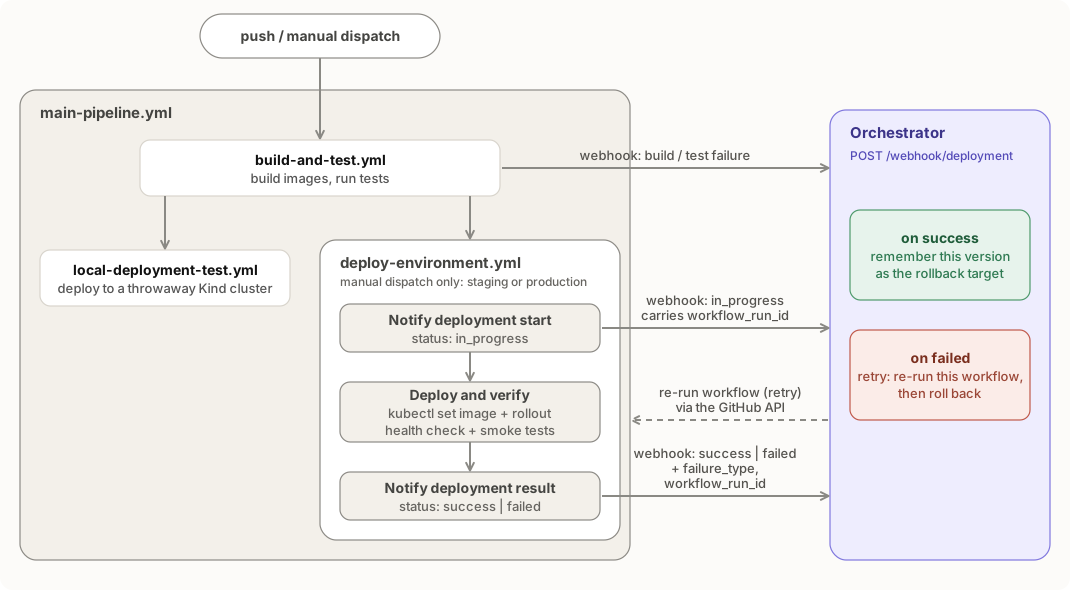
Two directions of integration:
- Pipeline to MANA: HTTP
POST /webhook/deploymentevents (no GitHub credentials needed, onlyORCHESTRATOR_URL). - MANA to pipeline: the orchestrator calls GitHub's workflow re-run API using
GITHUB_TOKENandGITHUB_REPO.
What the Shipped Workflows Send
| When | Workflow / step | status |
failure_type |
namespace |
Has workflow_run_id |
|---|---|---|---|---|---|
| Build or unit tests fail | build-and-test.yml, "Notify orchestrator on failure" |
failed |
build_failure or test_failure |
ci |
no |
| Deploy starts | deploy-environment.yml, "Notify deployment start" |
in_progress |
none | staging or production |
yes |
| Deploy ends | deploy-environment.yml, "Notify deployment result" (if: always()) |
success or failed |
see below | staging or production |
yes |
The result step derives the outcome from the earlier steps:
| Outcome | status |
failure_type |
|---|---|---|
| Deploy, health check and smoke tests all succeed | success |
empty |
| Health-check step failed | failed |
health_check_failure |
kubectl set image/rollout status failed |
failed |
deployment_failure |
| Anything else (smoke tests) | failed |
smoke_test_failure |
Deployments are only triggered by manual dispatch (workflow_dispatch with deploy_target set to staging or production). A push to main or develop builds, tests and validates in Kind but does not deploy. Because only the deploy workflow sends success events, the orchestrator learns a "known good" version only after a successful manual deploy. Until then, rollback relies on the ReplicaSet fallback.
Setup
1. Run the orchestrator and make it reachable
Deploy the orchestrator and Redis (see Getting Started or make deploy-app). The orchestrator's Service is ClusterIP, so GitHub-hosted runners cannot reach it as is. Choose one:
| Option | Notes |
|---|---|
| Self-hosted runner inside the network | Best fit: no public exposure. Point ORCHESTRATOR_URL at http://orchestrator-service.orchestrator.svc:8000 |
| Ingress or load balancer with authentication | Put an auth proxy (OAuth2 proxy, API gateway, mTLS) in front, or restrict by source IP |
| Private tunnel (Tailscale, Cloudflare Tunnel) | Convenient for demos |
Danger
The webhook endpoint has no built-in authentication. Do not expose it directly to the internet: anyone could submit forged failure events and trigger rollbacks. See Security.
2. Add repository secrets
In Settings, Secrets and variables, Actions:
| Secret | Value |
|---|---|
ORCHESTRATOR_URL |
Base URL, no trailing slash (for example https://mana.internal.example.com). If empty, webhook steps are skipped |
KUBE_CONFIG |
base64 -w0 ~/.kube/config for a context that can patch Deployments in the target namespaces. Use a dedicated, least-privilege ServiceAccount kubeconfig, not an admin one |
GHCR_PAT |
Personal access token with write:packages to push images to ghcr.io |
3. Give the orchestrator permission to re-run workflows
Create a fine-grained personal access token for the repository with Actions: Read and write (or a classic token with repo and workflow), then store it:
kubectl create secret generic github-token \
  --from-literal=token="<token>" -n orchestrator
Set GITHUB_REPO to owner/repo in orchestrator/k8s/deployment.yaml (it ships as othaime-en/mana, marked # REPLACE THIS) and restart the orchestrator. Confirm:
curl -s $MANA/health | jq .github_integration # true4. Prepare the target cluster
The deploy job runs kubectl set image deployment/sample-app sample-app=ghcr.io/<owner>/<repo>/sample-app:<version> -n <namespace>, so the sample-app Deployment (with a container named sample-app) must already exist in staging and/or production, and the cluster must be able to pull from GHCR (an image pull secret if the package is private). Create them with Terraform or make deploy-app first.
5. Use GitHub Environments (optional but recommended)
deploy-environment.yml runs in the staging or production environment. GitHub creates them on first use; add required reviewers on production to gate deployments.
6. Trigger a deployment
Actions, Mana Self-Healing Pipeline, Run workflow, choose staging. Watch the run, then the orchestrator:
kubectl logs -n orchestrator -l app=orchestrator -f | grep -E "webhook|AUDIT"
curl -s "$MANA/deployments/recent?namespace=staging" | jq
After a successful run the Redis key last_successful:staging:sample-app holds the deployed version.
Webhook Contract in Brief
{
  "deployment_id": "deploy-<run_id>-staging",
  "namespace": "staging",
  "app_name": "sample-app",
  "version": "v1a2b3c4",
  "status": "in_progress | success | failed",
  "failure_type": "build_failure | test_failure | deployment_failure | health_check_failure | smoke_test_failure | timeout",
  "metadata": {
    "commit": "<sha>",
    "author": "<actor>",
    "branch": "<ref>",
    "workflow_run_id": "<github.run_id>",
    "run_attempt": "<github.run_attempt>"
  }
}
Rules that matter:
deployment_idmust be stable across retry attempts of the same logical deployment, or the retry counter resets. The shipped workflows usedeploy-<github.run_id>-<namespace>, which a GitHub re-run keeps, and deriveversionfrom the commit SHA (v<sha7>) for the same reason.app_namemust equal the Kubernetes Deployment name, itsapplabel and its container name.versionmust equal the image tag you deploy, since rollback swaps tags.workflow_run_idmust be present on every webhook for a deployment that you want retried.failure_typemust be one of the six accepted values, and is required whenstatusisfailed. An empty string is treated as absent. Unknownstatusorfailure_typevalues are rejected with HTTP 422.
How a Retry Plays Out
- A deploy job fails; its last step posts
status=failedwithworkflow_run_id. - The orchestrator replies immediately with
action: retryand schedules a background task. - After the backoff (10 s, 20 s, 40 s by default) it calls
POST /repos/<repo>/actions/runs/<run_id>/rerun. - GitHub starts a new attempt of the same run. The attempt posts its own
in_progressandsuccessorfailedevents. - After more than
MAX_RETRIESfailures for one deployment ID, the orchestrator patches the Deployment back to the last good version instead.
The workflows never roll back themselves: the orchestrator is the only component that changes the image back. Until the fast-path rollback is built, a failed version therefore stays live while the retries run.
Timing matters: GitHub allows a re-run only for a run that has finished. The result webhook is sent from inside the run, so a short backoff can reach GitHub while the run is still active and be rejected. Watch the orchestrator log for Failed to trigger re-run or permission denied lines.
Recommended Workflow Changes
These small edits bring the workflows in line with the orchestrator's behaviour.
1. Send workflow_run_id on build-stage failures if you want them retried (add "workflow_run_id": "${{ github.run_id }}" to the metadata in build-and-test.yml). Note that these events use namespace: ci, for which there is no Deployment to roll back.
Sending Webhooks Safely
- Build the JSON with
jq -n --arg …rather than string interpolation; values with quotes or newlines break hand-built JSON. - Use
curl --fail-with-body --max-time <seconds>. Rollback is synchronous and can take up to five minutes, so set the timeout above that or treat a timeout as non-fatal. - Make the notification step non-blocking for the pipeline (
|| echo "notify failed", as the shipped steps do), but do not ignore repeated failures; alert on missing webhooks. - Run the notify step with
if: always()so failures are reported even when earlier steps fail.
Using Another CI System
Only the webhook half is CI-agnostic. Any system that can send the JSON above can feed MANA, and the orchestrator will record state, make decisions and perform rollbacks. Automatic retries are specific to GitHub Actions today because trigger_github_workflow_rerun calls GitHub's API. For other systems, either leave GITHUB_TOKEN unset (retries then log an error and no re-run happens) or extend the orchestrator with a re-run adapter for your system.
Troubleshooting
| Symptom | Likely cause | Check |
|---|---|---|
| Webhook steps print "Orchestrator URL not configured" | ORCHESTRATOR_URL secret empty |
Repository secrets |
curl: (6), (7) or timeouts |
Runner cannot reach the orchestrator | Use a self-hosted runner or tunnel; test with curl $ORCHESTRATOR_URL/health from the runner |
| HTTP 422 | Payload missing a required field or malformed JSON | Build with jq; compare with the contract above |
HTTP 422 mentioning failure_type |
Unknown failure_type, or status: failed without one |
Use one of the six values in the contract above |
action: alert with "missing workflow_run_id" |
The failure webhook has no metadata.workflow_run_id |
Send it on failure webhooks; build-stage failures currently omit it and always alert (see Recommended changes) |
| Retries scheduled but no new run starts | Token lacks Actions write permission, wrong GITHUB_REPO, or the run was still active |
Orchestrator logs: permission denied, Failed to trigger re-run |
| Retries never end in a rollback | New deployment_id per attempt |
Use deploy-${GITHUB_RUN_ID} |
action: alert with "No previous version" |
No successful deploy recorded and no versioned ReplicaSets | Run one successful deployment first, or ensure pods carry a version label |
kubectl set image fails |
Deployment or container is not named sample-app, or wrong namespace |
kubectl get deploy -n <ns> -o wide |
Error: KUBE_CONFIG secret not configured |
Secret missing | Add a base64-encoded kubeconfig |